If you’re seeing a message like “no suggestion”, it’s usually due to a misconfiguration in your AI Engine environment or because your AI provider (such as OpenAI) doesn’t have available credits/funding.
Check AI Engine
First, make sure you have an AI Environment properly set up in AI Engine. For example, you can configure an OpenAI environment under the Environments section.
Most importantly, in Default Environments for AI, ensure that you have selected a model under “Vision”, as this is what Media File Renamer will use to send its requests.
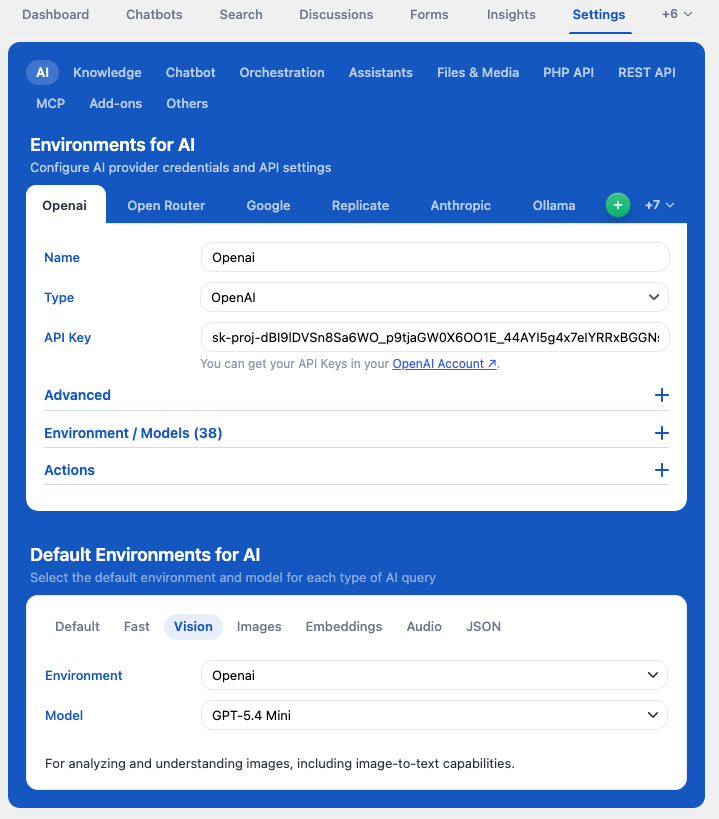
This will only work if you can actually send requests to the selected model.
If your API account doesn’t have access to that model, or if you don’t have sufficient funds/credits, it won’t work. This is not related to AI Engine or Media File Renamer.
Enable Logs
If you’re seeing errors like “No Suggestions” in the dashboard and want more details, you’ll need to enable logs.
First, enable Expert Mode from the plugin header.

This will add a new Advanced tab. Go there, and under For Advanced Users & Developers, enable Dev Tools. This will create a new Dev Tools tab. You can disable Expert Mode afterward if you don’t need it anymore.
In the Dev Tools tab, check Logs.
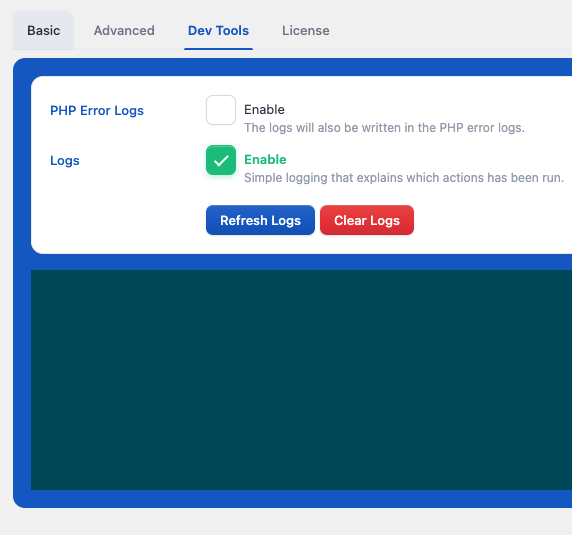
Then reproduce the error in the dashboard. After that, return to the Dev Tools tab and click Refresh Logs to see the detailed error information.
Then try generating a suggestion again and check the logs to see the actual error message. That will help identify the root cause.