To use this feature, you need to set up your Google environment. Go to Settings > Google and make sure you have your Google API registered, as well as your Search Engine ID.
The Custom Search API needs to be enabled in your Google project. If not, you won’t be able to use custom searches at all, and this feature won’t work. If you enabled this API recently, wait a few minutes for the action to propagate to Google’s systems, then try again.
Once enabled, you’ll see a new tab called Search Visibility that you can open. The goal of this feature is to create searches with a search query and an expected result.
For instance, if you’re selling cat books, you could search for that term, and the expected result would be your website. Then it will track how your expected result (your site) ranks on Google for that search.
Of course, you can also track sites other than your own since you can set the expected result to any site you want. This lets you monitor different results for your websites or competitors.
This card will show your current rank, the latest changes, and the top three sites that appear for this specific search.
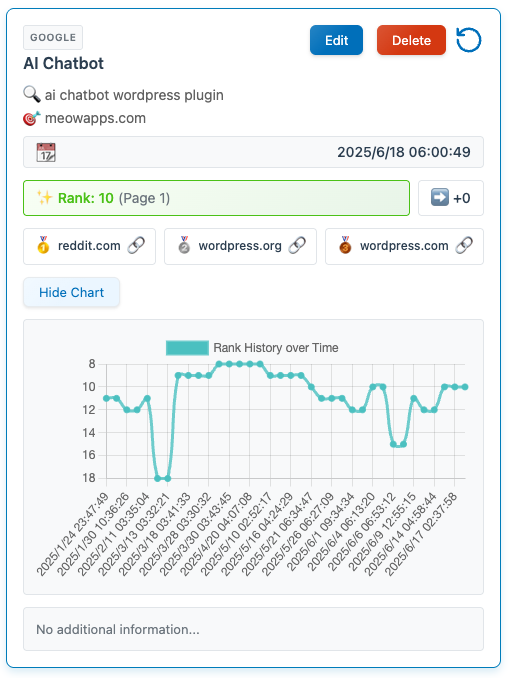
Here, you can see that if someone searches for “AI chatbot WordPress plugin”, the site meowapps.com appears as the 10th result on the first page of Google search. The most likely pages to appear in the top three are reddit.com, wordpress.org, and wordpress.com. You can click the attached links to view those pages live.