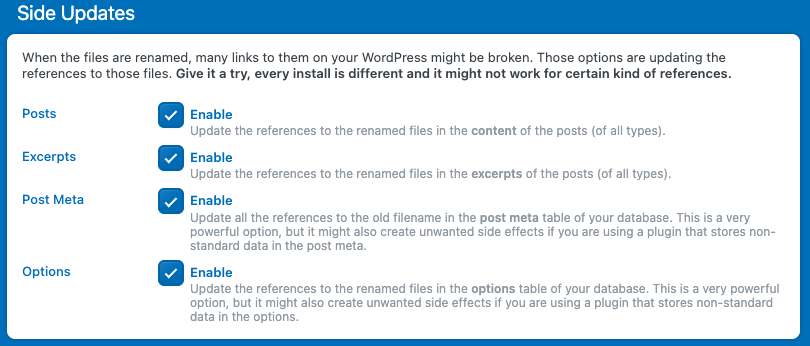
Renaming files can be tricky, some of your media files are referenced in posts or pages in different ways. Sometimes they’re linked by ID, and sometimes by filename. When a file is referenced by its filename, changing that name can break the connection, causing missing media or broken links on your site.
To prevent this, you can enable Side Update. When this feature is active, each time you rename a file, Media File Renamer will scan your database and automatically update all occurrences of the old filename wherever it’s been used. This keeps your media references intact and ensures your pages continue displaying correctly after renaming.
Go to Settings → Advanced → Side Updates to enable this option.
Some third-party plugins use their own database tables to store media references, which means the Side Updates feature won’t detect or update those links automatically.
In such cases, Media File Renamer relies on dedicated parser, small integrations designed to understand and update data from those specific plugins. You can check which parsers are available and enabled for your environment directly in the settings.
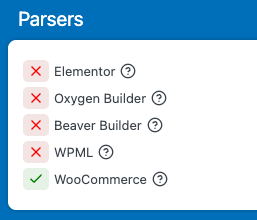
If you’re using a third-party plugin that isn’t yet compatible with Media File Renamer, don’t hesitate to contact support. If it’s not a widely used plugin (> 10k active installs), the team can often add a dedicated parser to the plugin itself, helping not just you but other users as well.
Meta Data References
When metadata values are modified, they can’t be processed the same way as filenames. Scanning your entire database to find and replace metadata references would be too risky and resource-intensive, so Media File Renamer doesn’t update those automatically.
Fortunately, this is rarely a problem. In most cases, your posts reference the media itself, not the metadata directly, meaning the updated metadata (like title or alt text) is pulled dynamically from the media file and displayed correctly.
If you notice that changes aren’t showing up, try clearing your cache and editing the post that contains the attachment. This forces WordPress to reload the updated metadata and display it properly.
For developpers
The following filters allow you to modify the URLs used during database, postmeta, and content updates when a media file is renamed. This is useful for scenarios like adding a CDN prefix, changing the root folder, or customizing the replacement logic.
Available Filters
- mfrh_update_database_options_urls
- mfrh_update_postmeta_urls
- mfrh_update_content_urls
- mfrh_update_excerpts_urls
Each filter receives an array: [ $orig_image_url, $new_image_url ] and should return the modified array. The “orig” is what is searched in your database and the “new” is the replace value.
Example: Add a CDN Prefix
Suppose you want to add a CDN prefix to all new image URLs during replacements:
<?php
add_filter( 'mfrh_update_database_options_urls', function( $urls ) {
    list( $orig, $new ) = $urls;
    $cdn_prefix = 'https://cdn.example.com';
    // Only add CDN to the new URL
    $new = $cdn_prefix . $new;
    return [ $orig, $new ];
} );
You can use the same logic for the other filters (just change the filter name).
Example: Add a Root Folder
<?php
add_filter( 'mfrh_update_postmeta_urls', function( $urls ) {
    list( $orig, $new ) = $urls;
    $root = '/media';
    $new = $root . $new;
    return [ $orig, $new ];
} );
These filters give you full control over how URLs are replaced in the database during media renames.