Unique Filenames
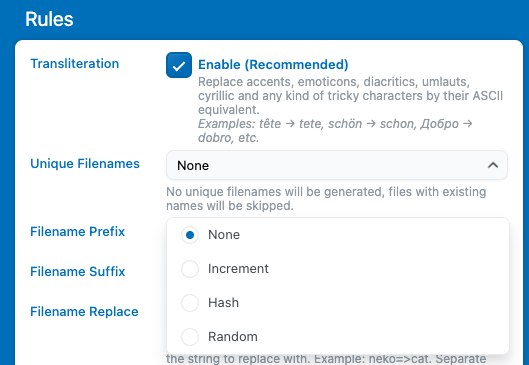
When a file is renamed, Media File Renamer checks whether the proposed filename already exists. If it does, the plugin will return an error message for that media item, since filenames must be unique.
To prevent this, you can configure a rule to automatically make filenames unique by adding a suffix. There are several methods available, for example, adding a number, timestamp, or short hash to the filename.
You can set this up in Settings → Advanced → Rules → Unique Filenames, where each method includes its own description to help you choose the one that best fits your workflow.
Custom Rules
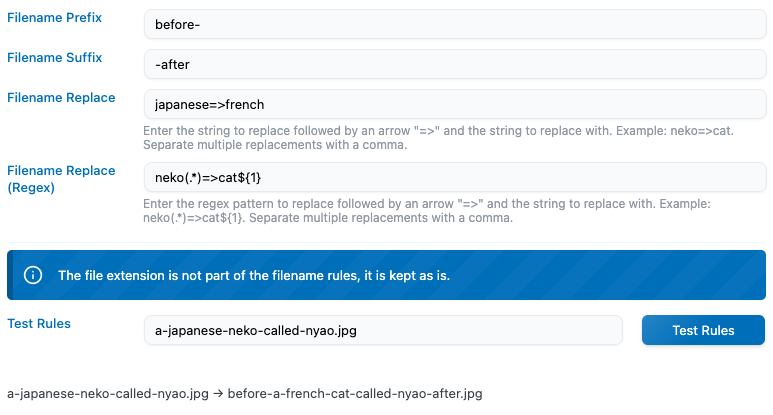
In Settings → Advanced → Rules, you’ll find several Filename Settings that let you define custom renaming rules. You can:
- Add a prefix or suffix to your filenames.
- Automatically replace specific character sequences if they’re detected in a filename.
These rules are applied to the currently proposed filename, meaning the name will already be sanitized before the custom rules are processed, ensuring the final filename remains clean and valid. This applies across all AUTO and Manual renames.
Custom AUTO Method
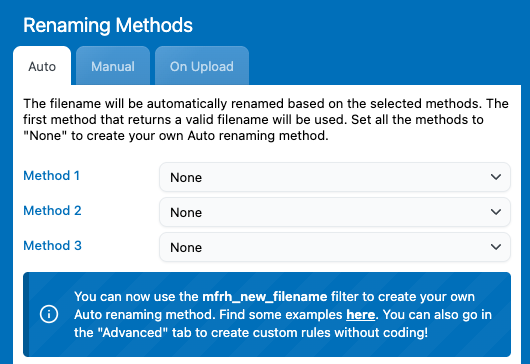
If none of the built-in AUTO methods fit your needs, you can create your own custom renaming behavior.
To do this, set every AUTO method to “None”, then use the mfrh_new_filename filter in your code. This filter allows you to define exactly how filenames should be generated, giving you complete control over the renaming logic, from custom patterns to dynamic naming rules based on your own conditions.
Here is an example. This one adds the upload date in front of the filename:
// Override the filename naming rules with this filter
add_filter( 'mfrh_new_filename', 'my_filter_filename', 10, 3 );

function my_filter_filename( $new, $old, $post ) {

  // Get the date from the $post (which is the media entry) and convert it to a timestamp
  $post_date = strtotime( $post['post_date'] );

  // Make this timestamp to looks like 2018-01-01
  $formatted_date = date('Y-m-d', $post_date);

  // Add this timestamp in front of the filename already decided by Media File Renamer
  $new_filename = $formatted_date . "-" . $new;

  return $new_filename;
}